


Approvals at a glance
See your approval queue, late submissions, and outstanding reimbursements — without opening another expense app or pinging the team in Slack.
Project spend, in plain English
Department breakdowns, project margins, vendor concentration — every month-end report your CFO asks for, assembled on demand.
Better than a custom GPT
Live workspace, not pasted data. Role-aware by default. Works across every team member, every device — install once, done.
The questions marketing leaders actually ask in chat:
"Which departments went over budget last quarter?"
"Show me variance against budget by team this year."
"What's our total spend by category for the board deck?"
"Format last quarter's spend for our investor update."
No query language. No knowing which dashboard the answer lives in. Ask, get the answer.


What's pending you, who hasn't submitted, what's stuck — pulled into your ChatGPT thread without opening another tab.
Pending approvals filtered to what you can act on
Outstanding submissions by team or individual
Reimbursement status — your team's and your own
A custom GPT can't read your live data, can't enforce your roles, and breaks every time your data changes.
The ExpenseMonkey connector is a real-time link to your workspace
One install, every conversation, every team member, with the ExpenseMonkey permissions you've already set. Read-only by design, so ChatGPT can never alter your books.
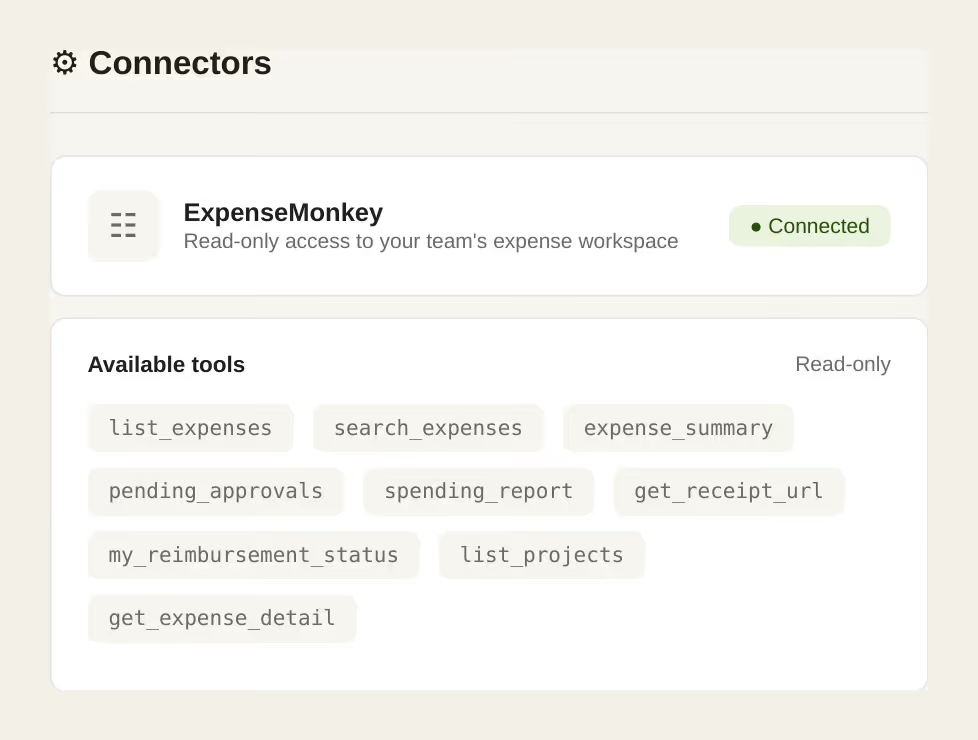
ExpenseMonkey runs as a custom MCP connector — also called an "App in ChatGPT" — that ChatGPT uses to securely query your live workspace. Once added, it can read your expenses, categories, and reports in real time.
Each person connects with their own ExpenseMonkey account. ChatGPT only sees what their role allows — submitters see their own submissions, managers see their teams, accountants and admins see the org. Existing roles do all the work; no extra permission system to manage.
To kill ChatGPT access for the whole workspace, flip a single toggle in settings
Once you connect ExpenseMonkey to ChatGPT, anyone on your team with a paid ChatGPT plan (Plus, Team, or Enterprise) can query the workspace in plain English. Ask about approval queues, project spend, missing receipts, expense reports, or budget status — ChatGPT pulls the answer from your live ExpenseMonkey workspace, with team permissions respected automatically.
The integration runs as a native MCP connector ("App in ChatGPT"), so there's no separate dashboard or browser tab — every team member uses it inside their normal ChatGPT chat.
Read approved expenses, search receipts, summarize spend, flag anomalies, surface pending approvals, and prep exports for your accounting tool. Cross-reference with Stripe, Linear, or anything else you've connected. It cannot overwrite ExpenseMonkey records — read-only by design.
ChatGPT reads on demand and doesn't store your data — each conversation discards the context when it ends. Every query is logged in your ExpenseMonkey activity log, so admins can audit what ChatGPT read and when. Revoke access in one click from either side. OpenAI's published policy is not to train on Business or Enterprise plan inputs.
ExpenseMonkey side: the integration is included in our Pro plan our other integrations.
OpenAI side: custom MCP connectors need a paid plan (Plus, Pro, Business, or Enterprise) — not the free tier.
Connect ExpenseMonkey to ChatGPT and turn your team's approval queues, project spend, and missing receipts into instant chat answers — for everyone, not just finance.
